Virtual Instructor-Led Training (VILT) offers a practical middle ground: the engagement and interaction of classroom learning combined with the flexibility and cost savings of online delivery. For small to mid-size businesses, VILT makes it possible to train teams consistently, stay compliant, and build skills without the logistical and financial burden of traditional face-to-face sessions.
Key Takeaways
- Live, instructor-led sessions keep remote and multi-location teams engaged without gathering on-site.
- Cuts travel and venue costs while preserving real-time Q&A, feedback, and peer interaction.
- Works best when you pair a solid platform with interactive content and a skilled facilitator.
- Pilot a few sessions first, then scale VILT as your training needs grow.
What Is Virtual Instructor-Led Training (VILT)?
Virtual Instructor-Led Training is live, instructor-led training delivered in a virtual environment where the instructor and learners connect in real time from different locations. According to the Association for Talent Development (ATD), VILT is synchronous, interactive online instruction led by a live facilitator over video conferencing, with participants joining from one or multiple locations.
VILT differs from pre-recorded online courses. While on-demand videos let learners watch at their own pace, VILT emphasizes real-time interaction, immediate feedback, and collaborative learning. Participants can ask questions, engage in discussions, and work through exercises together, just as they would in a physical classroom.
How VILT Works
A typical VILT setup includes:
- Video conferencing platforms that connect instructors and participants
- Screen sharing for presentations, demonstrations, and walkthroughs
- Interactive tools such as polls, live chat, reactions, and hand-raising
- Breakout rooms for small-group discussions and collaborative exercises
- Recording capabilities for future reference and participants who miss the live session
VILT has grown in popularity as remote work has become standard. U.S. teleworkers increased from 30.3 million (19.6%) in Q1 2023 to 35.5 million (22.9%) in Q1 2024, creating demand for cost-effective training that reaches employees wherever they work without giving up live interaction.
Common VILT Applications
Common applications include:
- Compliance training such as workplace safety, harassment prevention, and regulatory requirements
- Onboarding programs that introduce new hires to company culture, policies, and systems
- Skills development including leadership training, communication, and technical skills
- Professional development for ongoing learning and career growth
Those same formats fit specialized HR training. Moving Mountains HR runs customized VILT programs on leadership development, California employment compliance, performance management, workplace investigations, and related employee-relations topics. Sessions are tailored to each client’s industry and goals and delivered as workshops, leadership series, or coaching.
The Benefits of VILT for Small to Mid-Size Businesses
Cost Savings
VILT cuts the overhead that often puts classroom training out of reach for small businesses:
- No travel costs: employees join from their desks, skipping flights, hotels, and rental cars
- No venue rental: no need to book conference rooms or training facilities
- Lower materials cost: digital handouts replace printed workbooks and binders
- Less time away from work: employees train without full-day travel
For context, companies with 100-999 employees averaged $1,047 per learner in 2024, with travel and delivery representing significant portions of that budget.
Flexibility and Accessibility
VILT makes training accessible regardless of location:
- Employees in different cities, states, or time zones can join the same session
- Remote workers receive the same quality training as in-office staff
- Scheduling is easier without coordinating travel and physical space
- Sessions can be repeated or recorded for employees who can't attend live
For a 20-person company with staff in two states, that can mean one shared session instead of two separate trainings.
Scalability
VILT removes physical space constraints:
- Train small groups of 5-10 or larger cohorts of 50+ without worrying about room capacity
- Repeat sessions easily as new employees join or skills gaps emerge
- Scale training programs as the business grows without proportional cost increases
The delivery model holds at any size. Cisco used synchronous WebEx sessions to train 6,000 salespeople across five global regions in 48 business days, with about 25 production staff running 312 sessions. Small and mid-size teams get the same advantage at a smaller scale: add a cohort without adding a room, a trip, or a second instructor day.
Engagement Advantages
Real-time interaction keeps learners engaged:
- Live Q&A lets participants ask questions and get immediate answers
- Polls and surveys gauge understanding and gather input
- Group discussions and breakout rooms promote peer learning
- Interactive exercises and activities prevent passive watching
That live back-and-forth is what separates VILT from recorded videos your team starts and never finishes.
Compliance and Documentation
VILT simplifies record-keeping for regulated industries:
- Attendance tracking: platforms report who attended and for how long
- Session recordings: a permanent record of what was covered
- Easier audits: digital records are simpler to organize than paper sign-in sheets
- Consistent delivery: every participant gets the same core content
Microsoft Teams attendance reports and Zoom participant reports can include names, email addresses, join/leave times, and duration. That documentation supports compliance reviews without a binder full of sign-in sheets.
How to Get Started with VILT: A Step-by-Step Guide
Getting VILT off the ground is less about buying a tool and more about matching goals, platform, content, and facilitators. Work through these six steps before your first live cohort.
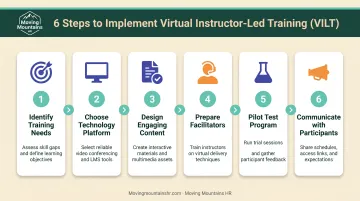
Step 1: Identify Your Training Needs and Goals
Determine what skills or knowledge gaps need to be addressed:
- What specific problems are you trying to solve?
- What business outcomes do you want (reduced incidents, stronger performance, faster onboarding)?
- Who needs training, and how often?
- What regulatory requirements must you meet?
Write those answers down. They drive platform choice, session length, and how you measure success.
Step 2: Choose the Right Technology Platform
Evaluate video tools against budget, IT constraints, and the interactions you need. ATD recommends screening platforms for:
- Breakout rooms for small-group work
- Screen sharing and annotation for live demos
- Chat (public and private)
- Polling and reactions for quick engagement checks
- Recording for people who miss the live session
- Whiteboarding for shared problem-solving
Common options include Zoom, Microsoft Teams, Google Meet, Adobe Connect, and Webex. No single tool owns corporate training, so weigh features, price, and how easily your facilitators can run a session.
Quick platform notes:
- Zoom: Strong breakout rooms, polling, and recording; familiar to most learners
- Microsoft Teams: Fits Microsoft 365 shops; solid attendance reporting
- Google Meet: Simple to join, though breakout rooms cannot currently be recorded
Step 3: Design Engaging Content
Build for the screen, not a copied classroom deck. Break material into short modules and:
- Keep live blocks to about 45–60 minutes with breaks. ATD caps sessions at two hours and treats ~90 minutes as the live-session sweet spot
- Add polls, Q&A, discussion prompts, and short activities every few minutes
- Use slides, short video clips, and live demos to hold attention
- Plan exercises, case studies, and breakout discussions so learners do more than listen
If you only broadcast slide decks, attention drops fast. Redesign each segment for virtual delivery.
Step 4: Prepare Your Facilitators
Classroom skill does not automatically transfer online. Make sure instructors can:
- Run the platform cold: screen share, polls, breakouts, and basic troubleshooting
- Engage the room: call people by name, pause for questions, and work the chat
- Lean on a producer or co-facilitator when possible. ATD favors a producer for tech so the facilitator stays on learning
Virtual delivery is its own craft. Programs such as ATD's Virtual Training & Facilitation Certificate help instructors build those muscles before go-live.
Step 5: Pilot Test Your Program
Run a trial with a small group before full rollout:
- Catch technical issues early (audio, platform glitches, connectivity)
- Collect feedback on content, pacing, and delivery
- Adjust what fell flat before the wider launch
A short pilot costs little and spares later cohorts from avoidable friction.
Step 6: Communicate Clearly with Participants
Send joining details well before the session:
- Technical requirements: internet speed, browser, device, and any software to install
- Joining link and start time, with the time zone spelled out
- Pre-work such as readings, short videos, or assignments
- Expectations on camera use, participation, and how Q&A will run
Clear instructions cut no-shows and tech chaos, and they signal that engagement matters from the first click.
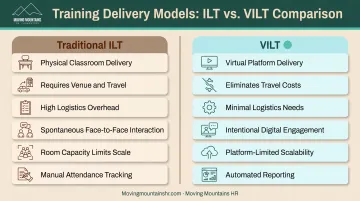
VILT vs. Traditional Instructor-Led Training: What's the Difference?
Both formats use a live instructor. What changes is the room—and with it, cost, reach, and how you keep people engaged.
| Dimension | Traditional ILT | VILT |
|---|---|---|
| Delivery | Physical classroom, face-to-face | Virtual platform, video conferencing |
| Cost | Venue rental, travel, printed materials | Minimal; platform subscription and facilitator time |
| Logistics | Requires physical space, travel coordination | Eliminates travel; requires reliable internet |
| Engagement | In-person body language, spontaneous interaction | Intentional engagement strategies, digital collaboration tools |
| Scalability | Limited by room capacity | Limited only by platform capacity |
| Documentation | Manual sign-in sheets, paper materials | Automated attendance reports, session recordings |
Delivery Methods
Traditional ILT takes place in a physical classroom with face-to-face interaction. VILT runs on video conferencing and virtual learning platforms, so teams in different locations can join the same live session. The instructor still leads in real time; only the room is digital.
Cost and Logistics
Traditional ILT requires venue space, travel arrangements, printed materials, and scheduling around physical availability. For dispersed teams, those costs multiply quickly. VILT removes most of those expenses and constraints, though it still needs reliable internet, working devices, and basic platform familiarity.
Engagement Differences
Traditional ILT offers body language, eye contact, and spontaneous side conversations. VILT needs more deliberate facilitation:
- Call on participants by name
- Use chat for questions and reactions
- Incorporate polls and quick checks
- Structure breakout discussions for small-group work
In return, VILT adds digital collaboration tools, session recordings for later review, and instant sharing of links and resources. Scale is limited mainly by platform capacity rather than room size, and automated attendance reports replace manual sign-in sheets.
Essential Technology and Tools for VILT
Effective VILT runs on three layers of tech: a video platform for live delivery, an LMS for scheduling and records, and lightweight add-ons for interaction. You do not need every tool on day one—match the stack to class size, compliance needs, and budget.
Video Conferencing Platforms
Start with a reliable video platform. Prioritize features that keep learners active:
- Screen sharing — present slides, demonstrate software, or show documents
- Breakout rooms — divide participants into small groups for discussion or exercises
- Chat functions — allow questions, comments, and resource sharing
- Polling — gauge understanding or gather input
- Recording — capture sessions for future reference or participants who miss the live event
- Attendance reports — document who attended and for how long
Weigh cost against the features you will actually use, plus the quality of technical support during live sessions.
Learning Management Systems (LMS)
An LMS can organize VILT programs by:
- Scheduling sessions — send reminders and calendar invitations
- Managing enrollments — track who's registered and completed training
- Distributing materials — share pre-work, handouts, and resources
- Storing recordings — provide on-demand access to past sessions
- Tracking compliance — maintain records for audits
An LMS isn't required for small programs, but it simplifies administration as training volume grows.
Supplementary Tools
Add a whiteboard or live-polling app when you want more interaction than chat and breakout rooms provide:
| Tool | Purpose | Key Features |
|---|---|---|
| Miro | Real-time shared whiteboard | Brainstorming, notes, diagrams, PDF/JPG export (free-plan boards are time-limited) |
| Mentimeter | Live questions and feedback | Anonymous input, quizzes, Q&A for live sessions |
| Slido | Live polls and Q&A | Word clouds, result export, audience engagement |
Use them alongside your video platform. They fill interaction gaps; they do not replace the live session itself.
Common VILT Challenges and How to Overcome Them
Even well-designed VILT can stall when engagement drops, tech fails, or facilitators rely on classroom habits. Here’s how to handle the three problems teams hit most often.
Engagement Challenge
Participants can easily become distracted or disengage in virtual settings. Unlike a physical classroom, you can't see if someone is checking email or multitasking.
Solutions:
- Run polls, questions, or short activities every 10–15 minutes
- Mix presentations, discussions, videos, and breakout exercises
- Ask for reactions, thumbs up/down, or quick chat responses often
- Keep sessions to 60–90 minutes so attention doesn’t fade
ATD recommends breakout groups of 3–4 people to maximize participation.
Technical Difficulties
Internet connectivity issues, unfamiliar platforms, and audio/video problems can disrupt learning.
Solutions:
- Send a quick-start guide with system requirements before the session
- Offer a short practice login so people can test audio, video, and tools
- Share a phone number or backup platform if the primary tool fails
- Assign a producer to handle tech issues so the facilitator can teach
Most disruptions shrink when setup, practice, and backup plans are in place before go-live.
Facilitator Skill Gaps
Not all great classroom trainers excel at virtual delivery. Virtual facilitation requires different techniques: managing chat, launching polls, reading virtual cues, and keeping remote participants engaged.
Solutions:
- Train facilitators on virtual engagement tactics and platform features
- Have them rehearse in the live platform before the real session
- Pair newer virtual trainers with experienced co-facilitators at first
A 2024 study of 159 faculty members found that remote-workshop facilitators had difficulty knowing whether participants were present and attentive, with distraction and competing duties as recurring concerns. Build check-ins, producer support, and rehearsal into every session so facilitators aren’t guessing who’s still with them.
Frequently Asked Questions
What is virtual instructor-led training?
VILT is live, interactive training delivered online where instructors and learners connect in real time through video conferencing platforms. It combines the engagement of classroom learning with the flexibility of remote delivery.
What is the difference between ILT and VILT?
ILT (Instructor-Led Training) happens in physical classrooms with face-to-face interaction, while VILT delivers the same interactive learning experience virtually. VILT eliminates travel needs and venue costs while maintaining real-time instructor engagement.
Is virtual instructor-led training effective?
VILT is effective when skilled facilitators use engaging content and interactive tools. Results hinge on session design and how actively participants take part. Well-run virtual sessions can match traditional classroom outcomes.
What are the different types of instructor-led training?
The main types are traditional in-person ILT (classroom-based), synchronous VILT (live virtual sessions), and blended learning that pairs live instruction with self-paced materials.
Ready to explore virtual training for your team? Moving Mountains HR delivers customized virtual programs in leadership, compliance, performance management, and workplace practices for small and mid-size businesses. Contact us at 866-474-3575 or staff@movingmountainshr.com to discuss your training needs.